

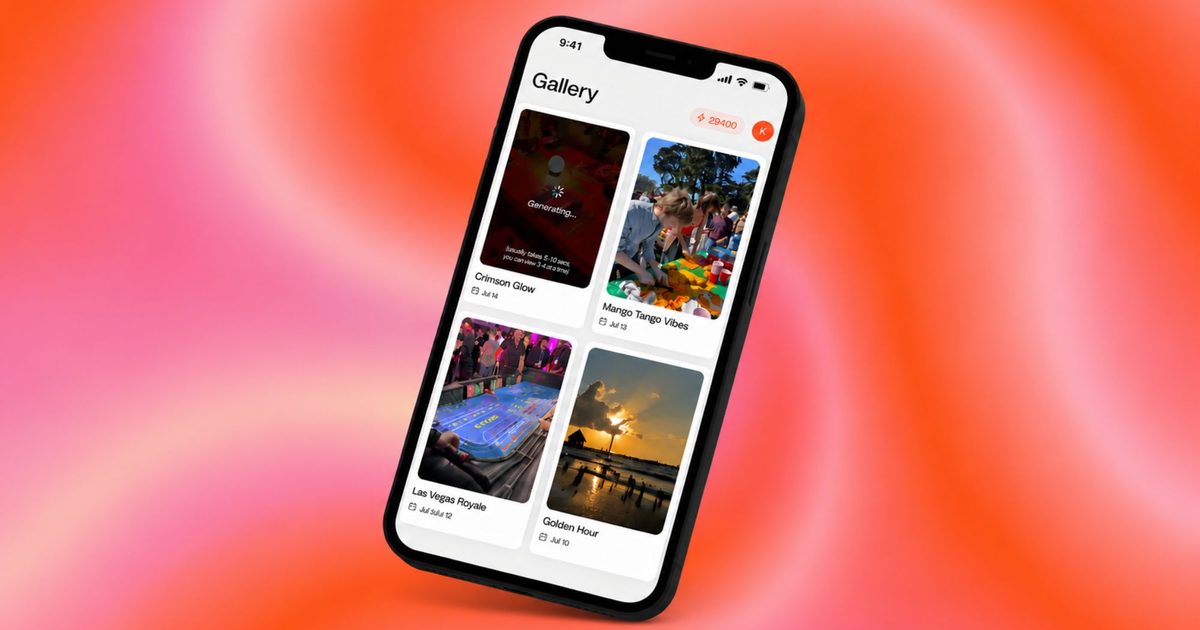
Your camera roll is probably packed with vacation photos, birthday videos, and random clips that never make it to Instagram or TikTok. If video editing has kept you from posting more on social media, a new app wants to take that job off your plate entirely. Reelful is an iOS app that uses AI to automatically turn your existing photos and videos into polished, ready-to-post reels for TikTok and Instagram.
How does Reelful turn your clips into polished social media videos?
You start by typing a prompt where you describe the story you want to tell, whether that is a travel recap, a product demo, or an event highlight. Next, you record a 30-second voice sample so the app can create a voice clone to narrate your video. Then you simply select the photos and clips from your camera roll that you want included. Reelful takes over from there, planning the video, writing the script, adding your AI voiceover, and assembling the final cut complete with captions, music, and sound effects.
The app can even animate still photos into short video clips, so a picture of someone holding a beer could turn into a brief moving clip of that same person taking a sip. Once your video is ready, you can keep refining it by chatting with the app to swap the music, tweak the script, or adjust other details.
Reelful leverages advancements in natural language processing and computer vision to understand the context of your media. The AI analyzes each selected photo and video frame to identify key subjects, actions, and emotions. It then structures those elements into a coherent narrative based on your prompt. For example, if you type "My weekend hiking trip," the AI will sequence clips chronologically, add transitions at scenic points, and match the music tempo to the dynamic moments. The voice cloning technology uses a short sample to capture your tone, inflection, and pacing, making the narration sound natural and personal rather than robotic.
This approach stands apart from traditional video editing software, which requires manual cutting, dragging, and layering of tracks. Even beginner-friendly tools like iMovie or CapCut demand a learning curve and hands-on effort. Reelful eliminates that friction entirely, positioning itself as a "set it and forget it" solution for busy social media users. The app’s reliance on chat-based refinement also mirrors the rise of conversational AI interfaces, popularized by tools like ChatGPT and Midjourney.
What does Reelful cost?
Reelful offers one-time credit purchases or monthly subscriptions, depending on how often you create content. Credit bundles start at five videos for $15, 15 videos for $43, or 33 videos for $90. Regular creators can choose the Creator plan at $25 a month for 10 videos or the Pro plan at $50 a month for 25 videos. Heavy users can opt for the Studio plan, which includes 60 videos a month for $100. The app is currently only available on iOS, with Android and web versions expected down the line.
The pricing structure reflects a competitive landscape. Other AI editing tools like RunwayML and Synthesia offer similar video generation but often target professionals with higher subscription fees. Reelful’s per-video credit system appeals to casual users who only post occasionally, while the monthly plans cater to influencers, small businesses, and content creators who need a steady stream of posts. For $100 per month, the Studio plan delivers 60 videos, which equates to roughly two posts per day—ideal for maintaining an active social media presence without hiring a dedicated editor.
However, the app’s reliance on voice cloning raises ethical questions. Deepfake legislation in several countries may affect how such technology is regulated. Reelful likely includes consent mechanisms, but users should be cautious about sharing voice samples that could be misused. The company’s terms of service and privacy policy will clarify how voice data is stored and processed.
From a technical standpoint, Reelful requires a stable internet connection for AI processing, as the heavy lifting is done on remote servers. This ensures fast generation but may limit usage in areas with poor connectivity. The app also integrates with Apple’s Photos library, leveraging iOS features like Live Photos and Memories to extract metadata for better context. Future updates could include direct posting to TikTok and Instagram, a feature many competitors already offer.
The broader market for AI video editing is expanding rapidly. According to a 2024 report by Grand View Research, the global AI video creation market is expected to grow at a compound annual rate of over 30% through 2030. Startups like Reelful, along with established players like Adobe (with its Firefly AI) and Canva (Magic Studio), are racing to capture the creator economy. Reelful’s niche lies in its hyper-specific focus on repurposing existing camera roll content, rather than generating video from scratch. This aligns with the behavioral trend of users having terabytes of unused media on their phones.
Influencers and small business owners may find Reelful particularly useful for reposting user-generated content or quickly creating product highlights. For instance, a coffee shop owner could film daily latte art shots and let the app compile a weekly promotional reel. A fitness coach could record random workout clips and turn them into a motivational montage. The ability to animate still photos adds a creative layer that mimics the cinematic Ken Burns effect, often seen in professional documentaries.
Despite its promise, Reelful faces challenges. The accuracy of voice cloning may vary depending on background noise during the sample recording. The AI’s choice of music and caption placement might not always match user expectations, requiring chat-based tweaks. Battery drain on iOS devices during AI processing is another concern, as the app may need to upload large video files. Moreover, the free tier appears absent; users must purchase credits or subscribe upfront, which could deter curious newcomers.
Looking ahead, the app’s expansion to Android and web will broaden its user base, especially in regions where Android dominates. Cross-platform synchronization would allow users to start a project on their phone and finish on a desktop. Integration with third-party storage services like Google Drive or Dropbox could also streamline media selection.
As social media algorithms prioritize short-form video, tools like Reelful lower the barrier to entry for everyday users. The app doesn't require you to learn editing software or understand pacing—it simply asks for your story and your media. Whether it becomes a staple on your home screen depends on how often you want to share your life online without spending hours in front of a timeline.
Source:Digital Trends News